How to collect wedding RSVPs without a wedding website
Plenty of couples skip the wedding website: the invitation says what it needs to, the venue has its own directions page, and nobody wants to build a site for one day. What you still need is a way for guests to say yes or no. Here are the three ways, honestly compared.
By the maker of Vowlist — guest list, budget and checklist free; the RSVP link is $79 once, no subscription. We name a competitor only with a link to their own page and the date we checked it.
Why couples skip the website
Because a website is a second project. It wants photos, an "our story", a registry, a hotel block, a design decision, and updates when the venue changes the parking. Most guests will open it once, look for two things — where and when — and go back to the invitation. If you already have those on paper (or in a group message), the only job left is the reply, and the reply does not need a website. It needs a place to answer.
The three ways to collect RSVPs without a site
1. Reply card + return envelope
You: print cards, stamp and address envelopes, open them as they arrive, retype every answer into a list, chase the ones that never come. Your guests: find a pen, find a post box, remember. Slowest, most traditional, and it works — for the guests who post it.
2. A shared form
You: build a form (any free form tool works), paste the link on the card or in a message, read the answers in a spreadsheet, tidy the spellings so "Tom Harrison" and "tom harrisson" are one person. Your guests: type their own names, guess whether the kids count, wonder if the form worked. Fast to set up; the reconciling is on you.
3. One private link per household
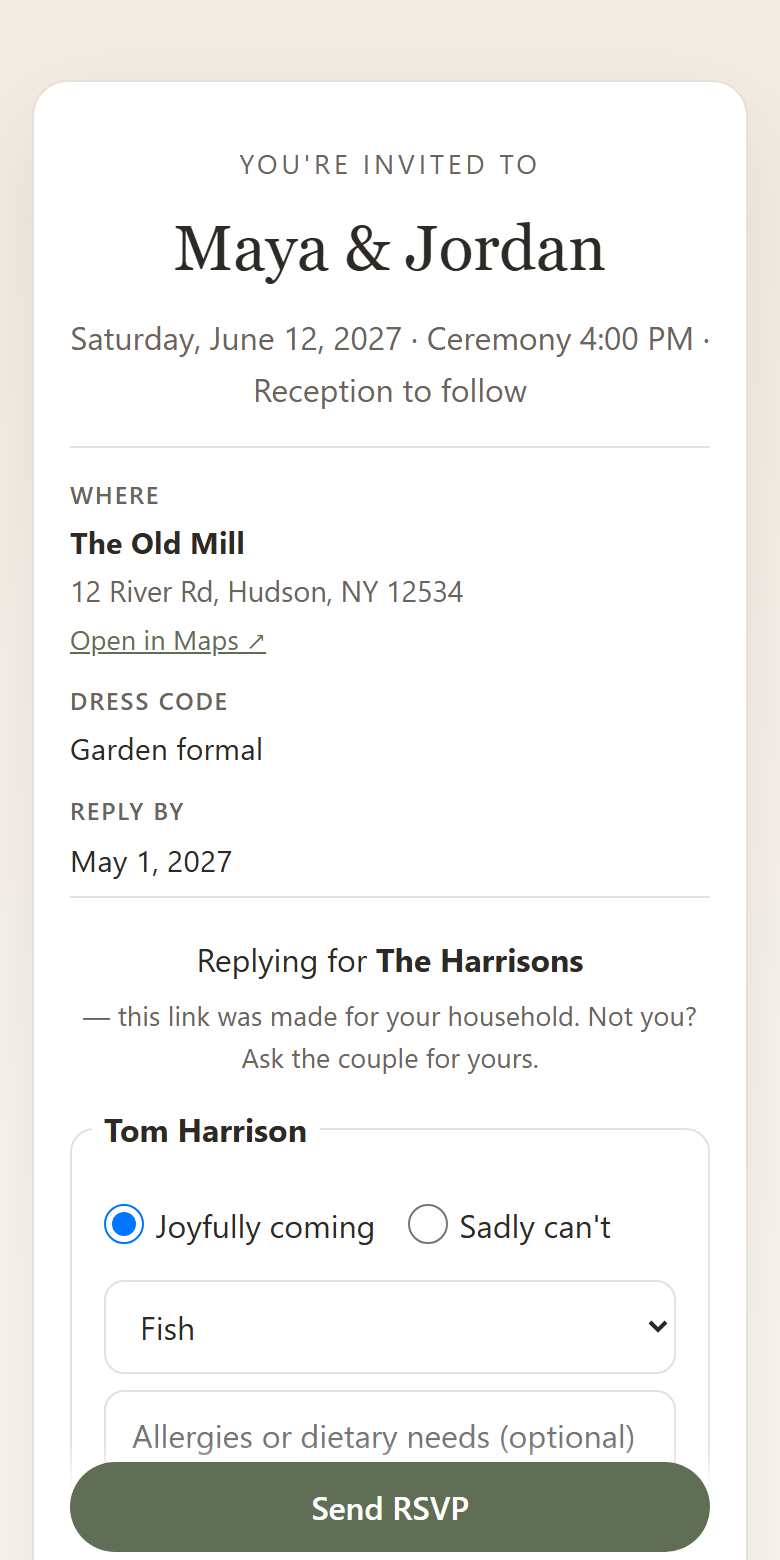
You: paste your guest list once (households, plus-ones, kids), send each family its own link — by text, email or a QR on the card. Replies land against the right names, meals and dietary notes included, exportable any time. Your guests: tap, see their own names already filled in, tick who is coming, pick a meal, done — no app, no account, no login, nothing to spell. Nobody sees anyone else's answers.
What each costs — you and them
| Approach | Your time | Guest effort | Guest needs an account? | Who sees what | Money |
|---|---|---|---|---|---|
| Reply card + envelope | Print, stamp, open, retype, chase | Pen, post box, memory | No | Only you | Cards + two stamps per household |
| Shared form | Build once, reconcile names for weeks | Type names, guess the rules | Usually no | Depends on the form; often anyone with the link can submit anything | Free tools exist |
| Per-household link (Vowlist) | Paste the list once, send links | Tap, tick, pick a meal | No — no app, no login | Each household sees only its own names; the wedding-wide link shows names only, never answers | $79 once for the RSVP link; guest list, budget, checklist free |
We are not claiming free tools cannot give you an RSVP link — some do. The difference we sell is the mechanic: per-household privacy, no guest accounts, no messages from us to your guests, and an export that is yours.
Walkthrough: card + QR + link, no website
- Sort the list into households — the free guest list template does it from a paste or a spreadsheet and hands the list into a free Vowlist account in one tap.
- Pick the reply-by date with the deadline calculator (it works back from the caterer's date, with the arithmetic shown).
- Write the ask — the RSVP wording generator has a version for a printed card, a QR card, a text and an email, in your tone.
- Put the link on the card as a QR code from the QR generator (print the URL underneath too), or text each household its own link.
- Watch replies arrive against the right names, chase the stragglers yourself the day after the deadline, export the CSV for the caterer and the seating plan.
Questions couples ask
Where do guests find the venue and time if there's no website?
On the invitation — and, if you use Vowlist, at the top of the RSVP page: date, time, venue name and address, dress code and a contact line are optional fields you fill in on Wedding details. Leave any blank and it simply does not show.
Can I still add a website later?
Yes. The RSVP link does not care where it is linked from — a card, a text, a QR code, or a website you build in month eleven. Nothing needs re-sending.
Do guests need to install anything?
No. Every phone camera opens the QR code, every browser opens the link. There is no app, no account and no password on the guest side, ever.
Start with the free part
Guest list, budget and checklist are free — no card, no cap. When you are ready for guests to reply online, the RSVP page is $79 once: one link per household, no app or account for guests, we never email or message them, everything exportable. Start free → · See the guest page →